

Table Of Contents
This journey started from a mix of curiosity and convenience. Some of us wanted to push a game a bit further and show off a better score. At the same time, as part of red team work, we were interested in how banking apps handled money behind the scenes. The goal was simple: attach a debugger, observe behavior, and figure out how things worked.
That did not always go as expected.
Some apps would exit immediately. Others ran for a while, then failed later without any clear reason. In a few cases, there was no usable crash at all. Each app behaved differently, but after going through enough of them, the same patterns kept showing up.
Developers of these apps are not relying on a single check anymore. They combine multiple techniques to make inspection harder and modification unreliable, even on non-jailbroken devices. The techniques themselves are not new. What stands out is how they are layered together and how early they are applied. Over time, it becomes less about a single protection and more about how they interact.
This article walks through a set of these techniques and how they show up in practice on iOS apps.
1. The App That Exploited iOS Side Channels
One app we looked at would fail before any meaningful logic executed. With no debugger attached and no modifications in place, the app still exits immediately on launch.
It turned out the app was performing early environment checks by relying on side-channel signals rather than explicit APIs. It called into a private system API and used the return behavior to infer whether certain apps were installed on the device. If anything suspicious showed up, it stopped there.
A notable case involved a banking application that used the private API SBSLaunchApplicationWithIdentifierAndURLAndLaunchOptions. It did not use the API for its intended purpose. Instead, it inspected the return logs as a side channel. By doing this, it could detect the presence of applications commonly associated with modified environments, based on bundle identifiers such as com.opa334.TrollStore, org.coolstar.SileoStore, com.tigisoftware.Filza, and others. If any of these were detected, the app assumed the device was not trustworthy and refused to proceed.
This specific behavior was later addressed by Apple in iOS 18.5 (CVE-2025-31207), but the pattern is still relevant.
Technique: Pre-execution environment checks
Query system APIs, including undocumented ones, for indirect signals
Use side-channel behavior such as API return logs to detect installed applications
Detect presence of known tools via bundle identifiers
2. The App That Checked Itself
Some apps go further and verify their own state before doing anything useful.
A common approach, especially in games, is to query code signing state using csops(). In particular, checking CS_OPS_ENTITLEMENTS_BLOB allows the app to retrieve its own entitlements. Unexpected entitlements can indicate a modified or non-standard environment. This gives the app another signal to decide whether it is running on a jailbroken device.
Some apps also verify their own integrity before continuing. This includes computing hashes such as CRC32 or MD5 across application data and checking the signing certificate of the installed IPA. Structures like LC_ENCRYPTION_INFO_64 are used to detect whether the app has been re-signed or altered.
Technique: Pre-execution environment checks
Use
csops()withCS_OPS_ENTITLEMENTS_BLOBto inspect entitlements and infer jailbreak statePerform file integrity checks using
CRC32andMD5Validate signing certificates and detect re-signing via
LC_ENCRYPTION_INFO64
3. The App That Killed Itself on Attach
Another pattern shows up once you try to attach a debugger: the app exits immediately.
In most cases, this comes down to ptrace() with PT_DENY_ATTACH. When that flag is set, any attempt to attach a debugger causes the process to terminate, usually through abort() or exit().
The usual way around this is to deal with the termination path rather than the detection. If the app cannot terminate itself, it continues running. Patching the execution flow to bypass calls to abort() and exit() is often enough to keep the process alive and allow runtime inspection.
When PT_DENY_ATTACH is used directly, there are also existing workarounds that modify or disable its behavior so a debugger can attach. These approaches have been documented in detail, including a write-up by Bryce Bostwick that walks through the process of dealing with ptrace() on iOS.
Technique: Runtime anti-debugging with ptrace()
Call
ptrace(PT_DENY_ATTACH)to block debugger attachmentTrigger process termination when debugging is detected
4. The App That Ruined Its Own Crash Logs
Some apps do not just exit. They also make sure you cannot learn anything from the crash.
We ran into one that behaved normally until you tried to debug it. Then the crash logs stopped being useful. Registers were filled with the same, impossible value, and the backtrace did not point to anything meaningful.
Looking closer, the app was writing garbage into the CPU registers before crashing. In one case, every register was set to a constant like 0x123456789a00. The crash still happened, but the state was no longer trustworthy, so there was nothing useful to extract from it.
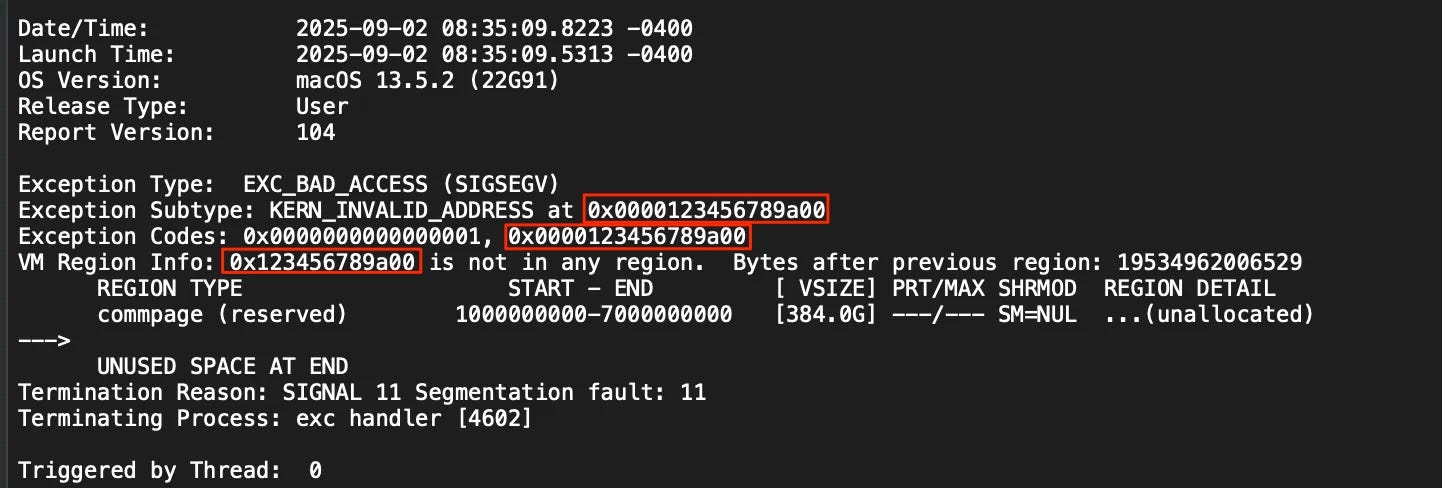
This makes it difficult to trace where the detection actually occurred. Even if you hit the right code path, the information you get back is already corrupted.
It does not prevent debugging entirely, but it slows things down. You have to find the check before the crash instead of relying on the crash itself.
Technique: Register corruption for analysis resistance
Overwrite register state before crashing
Produce garbage register values in crash logs
Obscure the origin of detection logic and break backtraces
5. The App That Let iOS Do the Killing
One game app produced probably the weirdest “crash” we have dealt with. The app would run, and as soon as we tried to debug it, it would get terminated without leaving any crash logs.
The reason was memory pressure. Instead of crashing directly through abort() or access violations, the app pushed memory usage high enough to trigger a jetsam condition. On iOS, jetsam is a kernel mechanism that kills processes when the system is under memory pressure or when an app exceeds its memory limits.
Because the system performs the termination, there is no normal crash log. You only get a jetsam record, and the anti-debug detection logic does not show up in any backtrace.
In this case, this behavior was combined with other checks such as jailbreak detection and tracing, which removes the usual approach of following a crash to locate the check.
Technique: Resource exhaustion to trigger jetsam
Allocate excessive memory to force OS-level termination
Avoid generating application crash logs
Leave only system-level jetsam records
6. The App That Kept Checking
Some apps pass the initial checks but still fail later.
In these cases, detection continues in the background and is enforced with delay. When a check fails, the app may record the state and only terminate after a timer elapses. That delay makes it harder to link the crash to the original trigger.
There is often a periodic task acting as a heartbeat. It wakes up at fixed intervals and re-runs parts of the detection logic, so passing checks once does not mean you are in the clear.
This setup makes behavior less predictable. Failures can happen later, without a clear signal of what caused them.
Technique: Continuous detection with delayed enforcement
Record tamper state and trigger crashes after a delay
Use timers to decouple detection from enforcement
Run periodic heartbeat tasks to re-check state
Re-trigger enforcement even after initial checks pass
Conclusion
Taken together, these examples show how things have changed. What used to be a single check or a simple ptrace() call is now a combination of techniques. Environment checks happen early, debugger detection is enforced at runtime, crash logs are made useless, and in some cases removed entirely through jetsam. On top of that, integrity checks and timed enforcement add another layer that keeps running after launch.
None of these techniques are especially complex on their own. The difficulty comes from how they are combined. You are not dealing with one mechanism, but a system where each part covers gaps left by the others.
For readers who are familiar with protection systems on Windows (anti-cheat, anti-debug, anti-tampering, etc.), you may wonder why they don’t use more aggressive techniques such as kernel level drivers and code injection. The answer is that iOS has a different security model and it does not allow kernel extensions or unsigned code execution.